16GB GPU पर स्थानीय AI कोडिंग: Strata, OpenCode और Qwen3.8
Table of Contents
16GB GPU पर स्थानीय कोडिंग एजेंट सीमित विकास कार्यों के लिए व्यावहारिक विकल्प है। Strata और OpenCode स्थानीय inference को फ़ाइल संपादन, shell commands और test execution से जोड़ते हैं। RTX 4060 Ti पर रिपोर्ट किए गए Qwen3.8-Flash-Next run ने paid inference calls के बिना एक application, बाद के बदलाव और racing-game prototype पूरा किया।
Subscription बदलने के लिए व्यापक test चाहिए। Published results एक मशीन पर चलने वाला setup दिखाते हैं। वे अलग भाषाओं, repositories या कठिन debugging tasks में paid coding services के बराबर प्रदर्शन सिद्ध नहीं करते। Hardware में 64GB system RAM भी है, जो model का बड़ा भाग संभालती है।
मुख्य बातें
- 16GB GPU memory को बताता है, reported configuration के लिए कुल memory को नहीं।
- Prompt reuse महत्वपूर्ण है, क्योंकि coding agents बार बार मिलते-जुलते conversation history भेजते हैं।
- Reasoning को budget चाहिए, ताकि planning code और tool calls के लिए जगह छोड़े।
- Generated tests पास होना केवल आंशिक प्रमाण है, Docker और gameplay के लिए अलग checks चाहिए।
- Zero API spend ownership costs को नहीं गिनता, जैसे electricity और maintenance time।
आवश्यकताएँ: Compatible computer, selected model के लिए पर्याप्त free storage, Git, npm सहित Node.js और terminal tools का अनुभव। Reported IQ3_S setup के साथ 64GB RAM रखें। अन्य configurations के लिए current Strata installer देखें।
समय और कठिनाई: Intermediate। Task completion speed का मूल्यांकन करने से पहले बड़े model downloads और installation के लिए समय रखें। Reported task timings में setup शामिल नहीं है।
Tested configuration
| Component | Reported configuration |
|---|---|
| GPU | NVIDIA RTX 4060 Ti, 16GB VRAM |
| CPU | Intel Core i5-11600K |
| System memory | 64GB RAM |
| Storage | NVMe SSD |
| Model | Qwen3.8-Flash-Next, 125B MoE, IQ3_S |
| Inference engine | Strata |
| Coding agent | OpenCode |
| Configured context | 65,536 tokens |
| Configured output limit | 16,384 tokens |
NetworkCoder की published configuration और results ये figures देती हैं। Test repository 46.84GiB expert weights को 28 seconds में load करने की report देता है। 4,431 experts GPU memory में 8.45GiB लेते हैं। ये measurements tested run का वर्णन करते हैं, किसी दूसरे engine version में allocation की guarantee नहीं।
Current compatibility इस test से व्यापक है। 6 October 2026 को जाँचे गए Strata project में कम से कम 12GB VRAM वाली selected NVIDIA और AMD cards तथा 32GB RAM systems के लिए छोटे models documented हैं। ये options 16GB GPU, 64GB RAM और IQ3_S वाले experiment को reproduce नहीं करते। Hardware खरीदने से पहले exact GPU, model variant और runtime support जाँचें।
Model कहाँ रहता है
Mixture of experts, या MoE, हर token के लिए model के expert networks का एक subset activate करता है। हर step पर सभी parameters चलाने की तुलना में active computation घटता है। बाकी weights को फिर भी storage और computation तक रास्ता चाहिए।
Strata का hybrid execution अक्सर उपयोग होने वाले experts को GPU पर रखता है और expert collection को system RAM में रखता है। CPU uncached experts को वहीं compute करता है और GPU cached experts संभालता है। Storage में model files और lookup data भी रहते हैं। System पूरे 125B model को 16GB VRAM में नहीं रखता।
GPU memory के कई competing uses हैं। Runtime allocations, attention state और expert cache सीमित resource साझा करते हैं। Context के लिए अधिक जगह remaining expert-cache capacity बदलती है। Current Strata versions KV-cache streaming भी support करते हैं, इसलिए exact placement पुराने configuration से अलग है। अपने engine version के लिए technical documentation देखें।
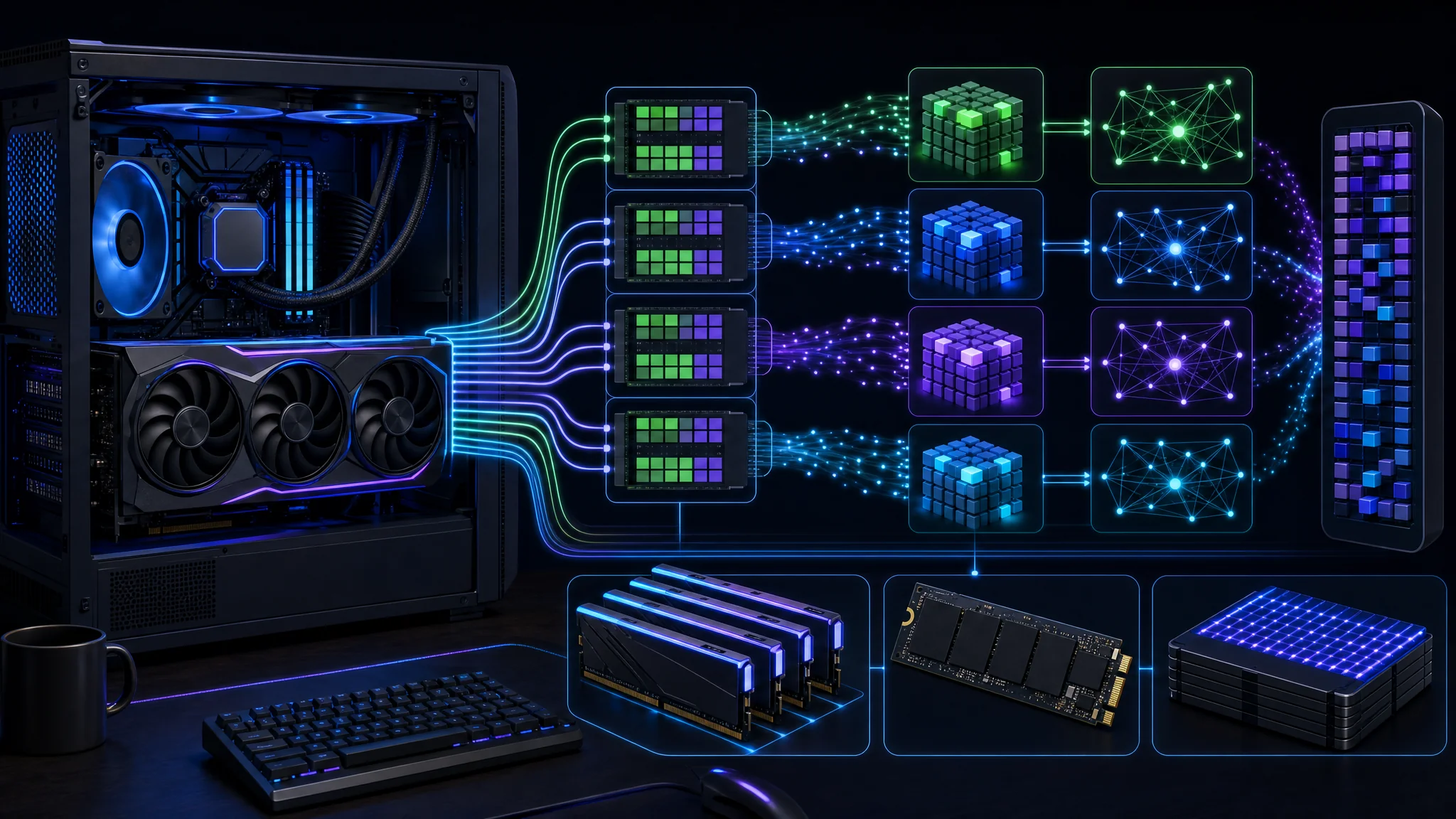
The GPU is one part of the inference system, alongside CPU execution, system RAM, and storage
Prompt reuse speed बदलता है
Coding agent loop में चलता है: task पढ़ता है, tool action माँगता है, result पाता है और अगला action चुनता है। File contents, errors और test output conversation में जमा होते हैं। Agents context को compact या select भी करते हैं, इसलिए हर implementation हमेशा पूरी unchanged history नहीं भेजती।
Prefill generation से पहले input tokens process करता है। Decode response बनाता है। Fast decode लेकिन slow repeated prefill वाला system tool calls के बीच आपको प्रतीक्षा करवाता है।
Reported 44K-token timing में prefix reuse था। Strata ने पहले process किए गए conversation content को reuse किया और बढ़ता prompt लगभग एक से तीन seconds में तैयार हुआ। Continuing agent session के लिए यह उपयोगी evidence है। यह सिद्ध नहीं करता कि 44,000 बिल्कुल नए tokens को एक second में scratch से process किया गया।
| Measurement | क्या record करें |
|---|---|
| Cold prompt | Reusable prefix state के बिना new content का समय |
| Warm continuation | Existing context में tool result जोड़ने के बाद का समय |
| Generation speed | Response के दौरान tokens per second |
| Task duration | Planning, generation, tools, tests और retries साथ में |
दो caches के अलग उद्देश्य हैं। Expert cache अक्सर उपयोग होने वाले weights को GPU computation के पास रखता है। Prefix reuse पहले के input पर दोहराया काम बचाता है। High expert-cache hit rate prompt-cache hit सिद्ध नहीं करता।
Tasks ने क्या दिखाया
| Task | Reported time | Reported outcome |
|---|---|---|
| Build task manager | 3m 38s | Express API, interface, 5/5 tests |
| Fix editing and add dates | 4m 58s | Changes complete, 6/6 tests |
| Add export/import and packaging | 3m 48s | 7/7 tests, Docker build unverified |
| Racing game, first attempt | 6m 35s | Reasoning में output खत्म, कोई code नहीं |
| Racing game, budgeted retry | 4m 51s | Game generated, JavaScript syntax checked |
Published results file first task में 48–52 tokens per second, second में 40–43 और third में 37–44 report करता है। “Up to 52” इन observations का peak है, हर task की sustained rate नहीं।
पहले तीन tasks एक application को बढ़ाते हैं। 5/5, 6/6 और 7/7 successive test suites हैं। इन्हें जोड़ना 18 independent capabilities सिद्ध नहीं करता। उसी agent द्वारा लिखे tests की coverage और assertions की समीक्षा भी चाहिए।
Environmental recovery work का हिस्सा थी। Agent ने inappropriate shell command से recover किया और testing के दौरान stale application server पहचाना। ये उपयोगी behaviors हैं, फिर भी shared development environment में existing process terminate करने के लिए deliberate permission चाहिए।
Docker unverified रहा। Agent ने Dockerfile लिखा, पर build के लिए running Docker engine नहीं था। Container के बाहर passing application tests working image सिद्ध नहीं करते। Game retry ने syntax check किया और browser खोला, पर agent के पास gameplay की direct visual confirmation नहीं थी।
Output के लिए जगह रखें
{
  "reasoning_budget_tokens": 8000
}
यह setting existing strata-iq3_s.json configuration में merge करें, दूसरे fields बचाएँ और selected Strata model restart करें। यह Strata setting है, OpenCode configuration file का replacement नहीं। Startup output में active budget verify करें।
Strata hard reasoning budget document करता है जो thinking phase समाप्त करके answer की ओर बढ़ता है। Request-level value configured default को override करती है। यह setting low या high जैसी general reasoning-effort instruction से अलग है।
First game attempt ने planning के दौरान अपना 16,384-token allowance समाप्त कर दिया। Retry ने 8,000-token thinking budget लगाया और code दिया। यह workload के लिए bounded reasoning phase का समर्थन करता है। यह 8,000 को हर task के लिए best setting सिद्ध नहीं करता।
Remaining output allowance maximum है, reservation guarantee नहीं। 16,384 total limit के भीतर 8,000-token cap पूरा खर्च हो तो अन्य overhead से पहले लगभग 8,384 tokens बचेंगे। Results log retry पर 11,054 written tokens report करता है, पर reasoning और code का complete split नहीं देता। इसे उसी limit के भीतर 8,000 reasoning plus 11,054 code न समझें।
Narrow edits के लिए छोटा budget रखें, फिर अधिक analysis वाले tasks पर बड़े budgets test करें। Complete file output, finish status और test results देखें। अधिक planning time तभी उपयोगी है जब delivered change सुधरे।
Strata और OpenCode connect करें
git clone https://github.com/Niko1221/Strata.git
cd Strata
./setup.sh
यह Linux setup entry point है। Current installation instructions देखें और documented Windows path के लिए START-HERE.bat इस्तेमाल करें। Reported configuration के करीब जाने के लिए original Qwen3.8-Flash-Next IQ3_S variant और 65,536-token context चुनें। Benchmark notes में engine version और model files save करें।
npm install -g opencode-ai
OpenCode install करें इसकी
official instructions
से। अलग terminal में STRATA_BASE_URL को Strata द्वारा printed local API base पर set करें, जिसमें /v1 suffix हो। इस setup के लिए inference को local machine तक सीमित रखें।
{
  "provider": {
    "strata": {
      "npm": "@ai-sdk/openai-compatible",
      "name": "Strata local",
      "options": {
        "baseURL": "{env:STRATA_BASE_URL}",
        "apiKey": "local"
      },
      "models": {
        "qwen3.8-flash-next-iq3_s": {
          "name": "Qwen3.8-Flash-Next IQ3_S",
          "limit": { "context": 65536, "output": 16384 }
        }
      }
    }
  },
  "model": "strata/qwen3.8-flash-next-iq3_s"
}
Provider block को ~/.config/opencode/opencode.json में merge करें, existing settings बचाएँ। यह
published example configuration
को environment variable से local endpoint load करने के लिए बदलता है। OpenCode
custom providers
और
environment substitution
document करता है।
local placeholder credential है, example के unauthenticated local setup से मेल खाता है। यह server को secure नहीं करता। Strata instance authentication enable करता हो तो appropriate local secret mechanism से configured credential दें।
Disposable project copy में opencode शुरू करें और configured model चुनें। Code भेजने से पहले selected provider verify करें। Client-side context declaration server का configured context नहीं बढ़ाती, और 65,536-token window input के लिए पूरी 65,536 जगह नहीं छोड़ती जब output के लिए भी स्थान चाहिए।
Local inference और permissions
{
  "permission": {
    "edit": "ask",
    "bash": "ask"
  }
}
Agent evaluate करते समय इन initial permissions को OpenCode configuration में merge करें। Permission documentation available controls समझाता है। File changes और shell execution inference की जगह से अलग आपकी machine को प्रभावित करते हैं।
Local inference हर tool को local नहीं बनाता। Package downloads, web tools, external integrations और optional sharing अब भी network services लेते हैं। Private repositories संभालने से पहले enabled tools देखें। “Model locally runs” का अर्थ “कुछ भी computer से बाहर नहीं जाता” नहीं है।
First run troubleshooting
| Symptom | पहले क्या जाँचें |
|---|---|
| Provider unavailable | Strata चल रहा है और environment variable OpenCode process तक पहुँचता है |
| Model selection में नहीं | Provider ID और model ID saved configuration से मेल खाते हैं |
| Context-limit error | Prompt length और requested output server की active window में फिट हैं |
| Planning without code | Reasoning budget, total output limit और finish status |
| Slow continuation | Prefix reuse, memory pressure, expert-cache behavior और competing processes |
| Docker command fails | Working engine उपलब्ध है, केवल command-line client नहीं |
एक समय में एक setting बदलें और saved starting state से वही task दोहराएँ। इससे configuration improvement को अलग prompt या आसान test से अलग रखा जाता है।
क्या यह subscription बदलता है?
| Local setup test करने योग्य है | दूसरी option उपलब्ध रखें |
|---|---|
| Compatible hardware पहले से है | Untested workload के लिए ही hardware खरीदना |
| Bounded application changes | Large unfamiliar repositories और difficult migrations |
| Repeatable acceptance tests | Correctness जाँचने का reliable तरीका न होना |
| Runtime maintenance का समय | Minimal setup और support overhead वाला काम |
Zero API spend महत्वपूर्ण है, खासकर जब hardware पहले से हो। इसमें electricity, hardware depreciation, storage और environment maintenance time शामिल नहीं हैं। Displayed zero-cost field भी इन खर्चों को meter नहीं करता।
Subscription comparison के लिए matched tasks चाहिए। दोनों systems में same starting repository, instructions और acceptance checks चलाएँ। Retries और human corrections को elapsed time के साथ record करें। Full workflow में first failed game attempt भी रखें, केवल successful retry report न करें।
Useful local agent को universal superiority नहीं चाहिए। यदि वह routine edits reliably संभालता है और कठिन tasks का छोटा set किसी अन्य tool को देता है, तो वह पहले से बदलता है कि आपको कौन सी paid services चाहिए। अपने projects पर accepted work से निर्णय लें।
Demonstration और next steps
आगे देखें: 125B local coding-agent demonstration । ऊपर के reported measurements published test के हैं, इस article के लिए किए गए independent benchmark के नहीं।
- एक छोटा task दोहराएँ fixed acceptance criteria और saved starting revision के साथ।
- Cold और warm turns मापें, prefix reuse को cold prefill speed न मानें।
- Packaging अलग verify करें successful image build, startup और container-level checks से।
- Generated tests inspect करें और वे cases जोड़ें जिनका implementation ने अनुमान नहीं लगाया।
- Completed work compare करें subscription बदलने से पहले current coding tool के साथ।
Hardware planning के लिए, local AI model और GPU context guide पढ़ें। Hosted-model behavior के लिए OpenRouter provider routing और costs देखें।
Related Posts